
Viewing the Outlook Contacts List
To display your Outlook Contacts, click OUTLOOK. The Outlook Contacts page displays.
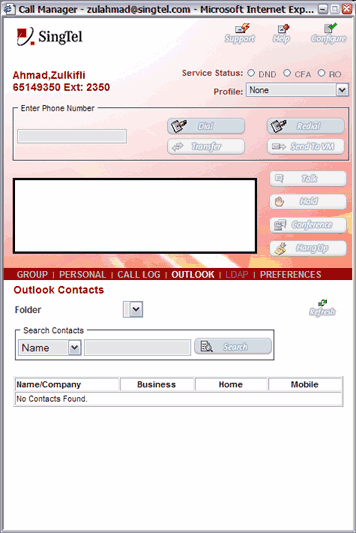
Call Manager - Outlook Contacts
The items displayed on the Outlook Contacts page are described below.
| Folder | A drop-down list to select the Outlook Contacts folder to display. |
| Search Contacts Name | A drop-down list to select a search string to search within Outlook Contacts. |
| Name/Company | Displays the name and company of the person in your Outlook Contacts. |
| Business | Displays the business phone number of the person in your Outlook Contacts. |
| Home | Displays the home phone number of the person in your Outlook Contacts. |
| Mobile | Displays the mobile phone number of the person in your Outlook Contacts. |
NOTE: Click REFRESH to update any list.